Firebase Dynamic Links (FDL) shut down on August 25, 2025. Existing page.link / *.app.goo.gl URLs stopped resolving, and Google isn't issuing new ones. If your app still depends on FDL — for onboarding links, referrals, or campaign deep links — those links are now dead, and any new links you need have to come from somewhere else. Here's what to replace FDL with and how to migrate without breaking your app.
What FDL actually did (so you replace the right things)
- Deep links that opened your app on a specific screen (iOS Universal Links + Android App Links).
- Deferred deep linking — a user without the app installed it, then still landed on the intended screen after first open.
- Short links with a preview and basic click analytics.
- An app → app store → web fallback so no tap hit a dead end.
A good replacement has to cover all four — not just make a short link.
What to look for in an FDL alternative
- Hosted apple-app-site-association and assetlinks.json so Universal/App Links verify.
- Deferred deep linking that survives an install.
- The full app → store → web fallback.
- Analytics and a developer API so you can measure and automate.
- Predictable pricing — ideally a free tier, not per-install billing.
Why lynkily is a clean FDL replacement
lynkily Deep Links maps almost one-to-one onto what FDL gave you: it hosts your association files automatically on your own branded domain, applies app → store → web routing to every link, and does deferred deep linking via a simple REST call your app makes on first open (no heavy SDK). You also get a deep-link analytics funnel and a developer API with keys and webhooks — free to start (25,000 clicks/month), then flat plans with no per-install fees. See the side-by-side on our lynkily vs Firebase Dynamic Links page.
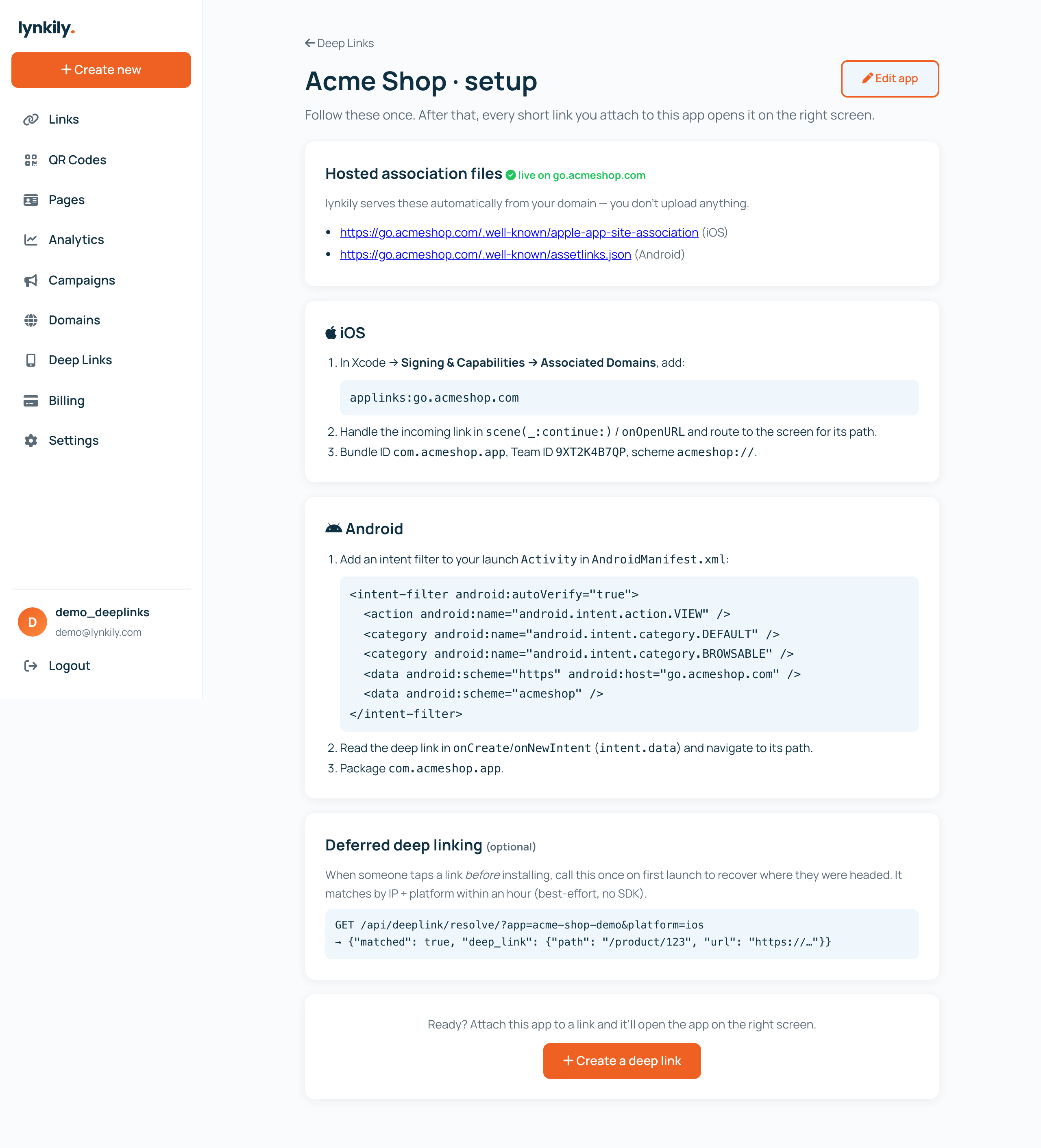
Step-by-step: migrate off Firebase Dynamic Links
- Register your app in lynkily — bundle ID + Team ID (iOS), package name + SHA-256 (Android), your URL schemes and store IDs.
- Connect a branded domain (e.g.
go.yourapp.com). lynkily serves your AASA and assetlinks.json on it with the correct headers. - Recreate your links as lynkily deep links (dashboard or API). Each opens the app on the right screen with a store + web fallback.
- Handle the incoming link in your app (you already do this for FDL) and, for installs, call lynkily's resolve endpoint once on first launch to recover the deferred destination.
- Swap the links in your bio, ads, emails and QR codes. Test all three branches: app installed, not installed, and desktop.
New links, not just a migration
Even if you never used FDL, its shutdown removed the default free option a lot of teams reached for. lynkily fills that gap with the same capabilities at flat pricing. New to the topic? Start with what is deep linking and how to create a deep link.